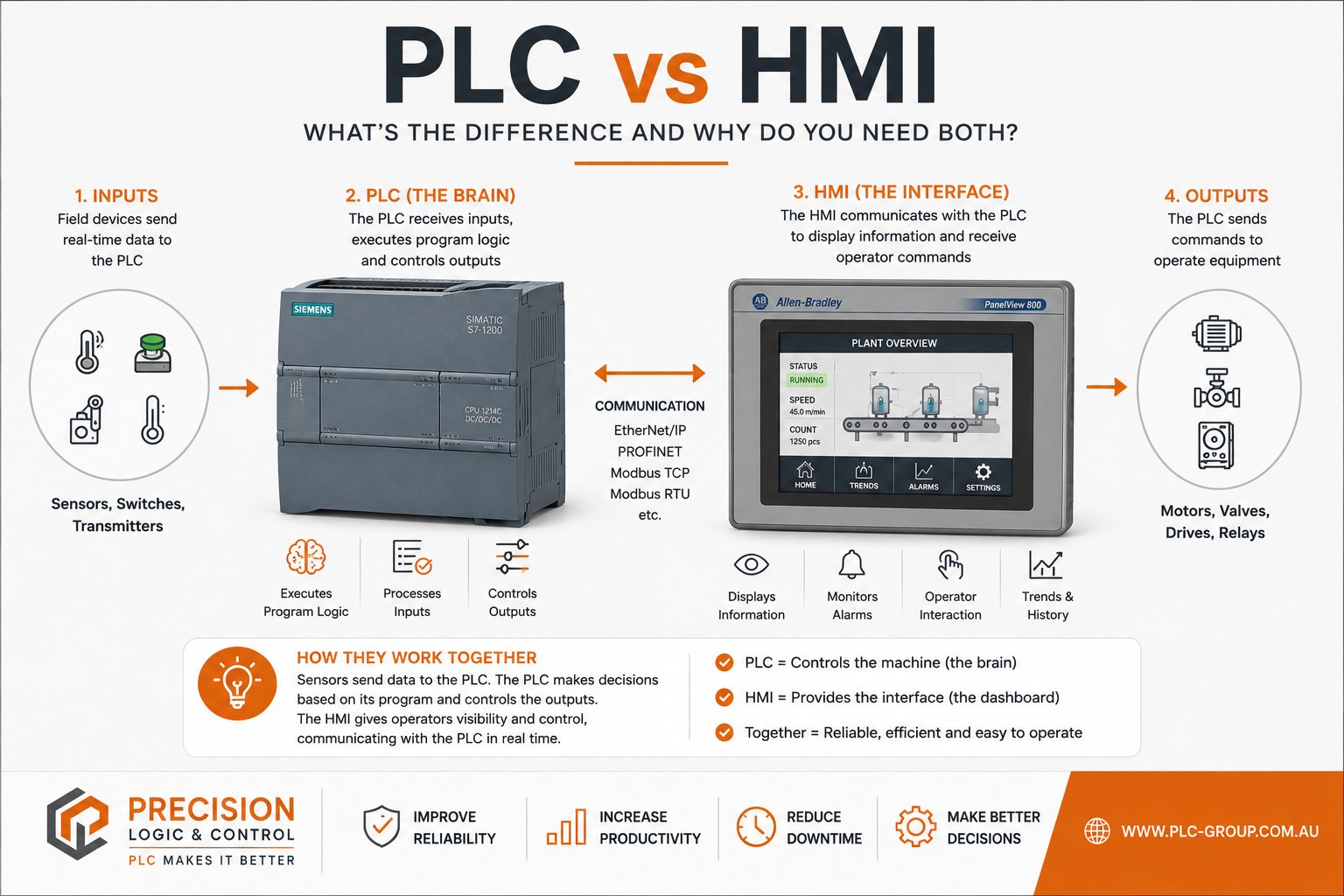
Industrial automation systems rely on multiple components working together to keep machinery operating safely and efficiently. Two of the most important technologies you’ll encounter are Programmable Logic Controllers (PLCs) and Human Machine Interfaces (HMIs).
Although they are often mentioned together, they perform very different roles within an automation system. A PLC is responsible for controlling machines and processing input and output signals, while an HMI provides operators with a visual interface to monitor equipment, adjust settings and respond to alarms.
Understanding the difference between a PLC and an HMI is essential when designing, upgrading or troubleshooting industrial control systems. Choosing the right combination can improve productivity, reduce downtime and simplify maintenance.
In this guide, we’ll explain what PLCs and HMIs are, how they work together, their key differences and where each fits into modern industrial automation.
PLC vs HMI at a glance:
A Programmable Logic Controller (PLC) is an industrial computer designed to automate machines and processes by continuously monitoring inputs, executing programmed logic and controlling outputs in real time.
Unlike a standard computer, a PLC is built specifically for harsh industrial environments. It is designed to withstand vibration, dust, electrical noise, temperature fluctuations and continuous 24/7 operation, making it one of the most reliable components in an industrial automation system.
A PLC receives information from sensors, switches and other input devices, processes that information according to its programmed logic, and then sends commands to output devices such as motors, valves, relays and actuators.
A Human Machine Interface (HMI) is the visual interface that allows operators to monitor, control and interact with an industrial automation system.
Unlike a PLC, an HMI does not make control decisions. Instead, it communicates with the PLC to display real-time information such as machine status, production data, alarms and process values. It also allows authorised users to start or stop equipment, adjust operating parameters and acknowledge alarms through an easy-to-use graphical interface.
Modern HMIs typically feature touchscreen displays and intuitive dashboards, making complex automation systems much easier to operate and troubleshoot.
Although PLCs and HMIs work closely together, they perform very different roles within an industrial automation system.
A PLC is the “brain” of the system. It continuously reads inputs from sensors, executes the programmed control logic and sends commands to outputs such as motors, pumps and valves.
An HMI acts as the “window” into that system. It allows operators to see what the PLC is doing, monitor system performance and interact with the machine without changing the underlying control program.
In simple terms:
Neither device replaces the other. In most industrial applications, they are designed to work together to provide safe, efficient and user-friendly machine operation.
| Feature | PLC | HMI |
|---|---|---|
| Primary Role | Controls machines and processes | Displays information and allows operator interaction |
| Function | Executes programmed logic | Provides a graphical user interface |
| User Interaction | Usually programmed by engineers | Used daily by operators and technicians |
| Inputs | Sensors, switches, transmitters | Touchscreen, keypad or operator commands |
| Outputs | Motors, valves, relays, actuators | Display screens, alarms and notifications |
| Makes Decisions? | ✅ Yes | ❌ No |
| Stores Control Logic? | ✅ Yes | ❌ No |
| Displays Real-Time Data? | Limited | ✅ Yes |
Rather than choosing between a PLC and an HMI, most industrial automation systems use both devices together.
The PLC continuously controls the automation process by monitoring inputs and operating outputs, while the HMI communicates with the PLC to present information in a format that operators can easily understand.
For example, in a packaging machine:
This division of responsibilities allows automation systems to remain both reliable and easy to operate.
Think of the PLC as the “brain” and the HMI as the “dashboard.”
The PLC performs all the control decisions, while the HMI provides operators with the information and controls needed to manage the process safely and efficiently. Separating these roles improves system reliability, simplifies troubleshooting and makes future upgrades much easier.
One of the most common misconceptions is thinking that an HMI can replace a PLC.
An HMI is designed to display information and allow operators to interact with a machine, but it does not execute control logic. The PLC is responsible for processing inputs, making decisions and controlling outputs.
In most industrial automation systems, the PLC and HMI are complementary technologies that work together. Removing either device usually reduces functionality, visibility or operational flexibility.
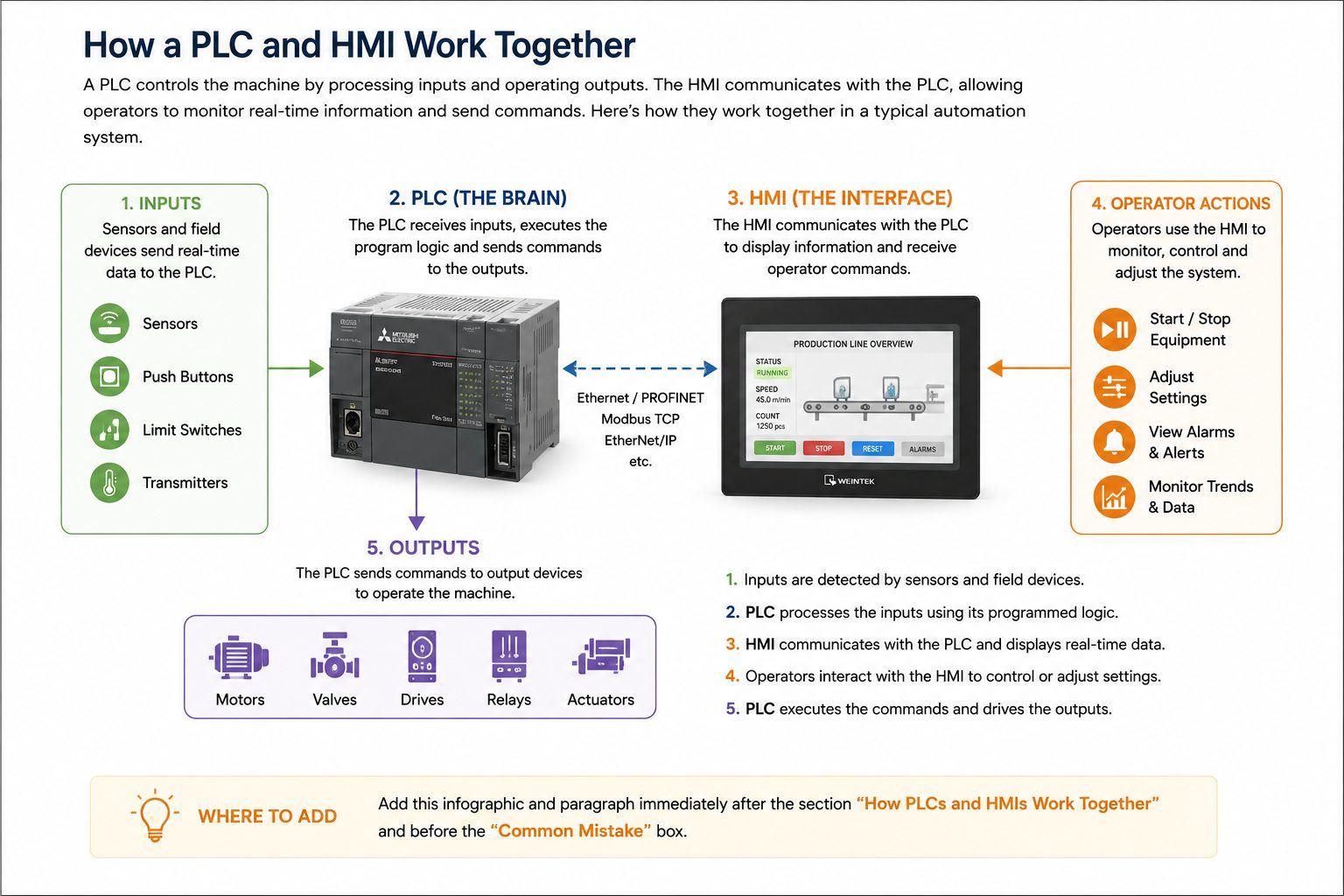
The infographic above illustrates how a PLC and HMI complement each other within a typical automation system. Field devices such as sensors and switches send input signals to the PLC, which processes the information using its programmed logic. The PLC then controls outputs including motors, valves, relays and drives.
At the same time, the HMI communicates with the PLC to display machine status, production data, alarms and operating parameters. When an operator presses a button or changes a setting on the HMI, the command is sent back to the PLC for validation and execution. This separation of control and visualisation creates a reliable, safe and user-friendly automation system.
A PLC controls machinery by executing programmed logic, while an HMI provides operators with a graphical interface to monitor and interact with the PLC.
In most industrial applications, no. An HMI typically communicates with a PLC to display real-time information and send operator commands. Without a controller, the HMI has little or no functionality.
Yes. A PLC can control machinery independently once programmed. However, without an HMI, operators have limited visibility of machine status, alarms and operating parameters.
No. Smaller automation systems may operate without an HMI, particularly where minimal operator interaction is required. Larger or more complex systems usually benefit from an HMI for monitoring and diagnostics.
Common protocols include EtherNet/IP, PROFINET, Modbus TCP, Modbus RTU, PROFIBUS and OPC UA, depending on the manufacturer and application.
Yes. Many modern HMIs support communication with multiple PLCs, allowing operators to monitor and control several machines from a single interface.
Consider the required screen size, communication compatibility, environmental conditions, user interface requirements and future expansion needs.
Specialist industrial automation suppliers can assist with new, refurbished and obsolete PLCs, HMIs, spare parts and repair services across a wide range of manufacturers.
PLCs and HMIs perform different but equally important roles within an industrial automation system. While the PLC provides the intelligence that controls machinery and processes, the HMI gives operators the visibility and control needed to operate equipment safely and efficiently.
Rather than choosing one over the other, most industrial applications rely on both technologies working together. Selecting compatible hardware, planning for future expansion and maintaining reliable communication between devices are all essential for achieving long-term system performance.
By understanding how PLCs and HMIs complement each other, maintenance teams, engineers and system integrators can make informed decisions when designing new automation systems or upgrading existing installations.
Whether you’re sourcing a replacement PLC, selecting a compatible HMI or maintaining a legacy automation system, Precision Logic & Control can help. We supply new, surplus and refurbished industrial automation components, along with repair services and technical support for businesses across Australia.
© Copyright 2026. Precision Logic & Controls All Rights Reserved.